Accounting Home
Accounting Dashboard, Implementation Spec (Version 2)
What an engineer needs to build this dashboard and its widgets as they appear in the Demo view: design tokens, the responsive grid, the three widget sizes plus the KPI band, the toolbar and edit flow, overlays, widget states, accessibility, and the full widget inventory. Every visual value resolves from Pathway Design System tokens; nothing wears a raw hex.
1. Design tokens
Colour, spacing, radius, border, type and motion come from the Pathway Design System, loaded over CDN: package @helloimjolopez-pathway/pathway-tokens@10.0.4, files dist/primitives.css and dist/themes/light.css. Source: github.com/helloimjolopez-collab/pathway-ds.
- Primitives (
--primitive-color-{family}-{step}): the raw ramps (cool-neutral, warm-neutral, brand, amethyst, red, green, saffron, orange and the accent families), with alpha variants on anchor steps for tints and scrims. - Semantics (
--semantic-color-{fill|foreground|stroke}-*,--semantic-layout-units-*,--semantic-type-*): role tokens. Surfaces are warm (widget and header on warm-neutral-0), text is cool grey, the canvas is cool-neutral-10. - Page aliases: the page declares short aliases on
:rootthat point at the DS tokens, and all widget CSS uses the aliases. Text--txt-primary / -secondary / -subtle / -pos; neutrals--wn-*(warm) and--cn-*(cool); brand--brand-10 .. --brand-500; charts--am-50 .. --am-700(amethyst),--chart,--chart-soft,--chart-strong; status--pos-100,--red-100; strokes--stroke-widget,--stroke-container; surfaces--surface-canvas / -header / -sheet / -widget; spacing--gap-*and--padding-*; radius--cornerradius-xsmall / -small / -medium / -full; motion--dur,--dur2,--ease,--dec; focus--focusring-base. - Rule: semantic where a role fits, primitive only where no semantic exists (categorical chart series, alpha scrims and shadows). Charts are amethyst; red is reserved for true alarms (overdrawn, overdue, rejected).
Type scale (--semantic-type-*)
| Token | Size | Used for |
|---|---|---|
| font-size-xl | 24px | KPI metric values (22px inside a Glance tile) |
| font-size-l | 20px | Overlay titles |
| font-size-r / m | 16 / 18px | Section headings |
| font-size-s | 14px | Body, table rows |
| font-size-xs | 12px | Secondary text, badges, chips |
| font-size-xxs / xxxs | 11 / 10px | Column headers, captions |
Families: Red Hat Display (metric values, titles; weights 600 and 700), Red Hat Text (body; 400 to 700), Material Symbols Rounded (icons). All three load from Google Fonts.
Spacing, radius, border (--semantic-layout-units-*)
| Scale | Values |
|---|---|
| gap | 2, 4, 6, 8, 12, 16 (base), 24, 36px |
| padding | 2, 4, 6, 8, 12, 14 (medium), 16 (base), 24, 36, 48px |
| corner radius | 2, 4, 8 (base), 12 (large), 16 (xlarge), 999 (full) |
| border width | 0.5, 0.75, 1, 1.5, 2, 4px. Pathway buttons: Fill and Naked have no border, Outlined has a 0.75px stroke |
| touch target | 36 (desktop), 44 (AA), 48 (AAA) |
Motion and elevation
Durations --dur (micro) and --dur2 (enter); easing --ease for most transitions and --dec (decelerate) for overlays. Every animation is switched off under prefers-reduced-motion. Shadows come from --elevation-widget / -lift / -overlay, never a hand-rolled rgba.
2. Responsive grid
The dashboard is a CSS grid whose column count follows the viewport width through media queries. The side navigation (216px) is hidden at 900px and below, so the grid takes the full width on tablet and phone.
| Viewport width | Columns |
|---|---|
| under 768px | 4 |
| 768px and up | 8 |
| 1024px and up | 12 |
grid-auto-rows: 48px, gap: 16px (gap-base), grid-auto-flow: row dense, so a Glance tile backfills a gap left by a larger widget. Widgets span whole columns and rows; a widget's height is its row span times 48px plus the gaps between rows.
3. Widget sizes
Three sizes, Glance (kpi), Explore (wide) and Detail (xwide), plus the Financial KPI band, which is not a grid widget: it is mounted full width above the grid (#fkpBand) and has one size. Column span adapts to the current column count; row span is fixed per size. Each widget declares which sizes it offers (tiers); the size picker shows only those.
| Size | 4-col | 8-col | 12-col | Rows | Role |
|---|---|---|---|---|---|
| Glance (kpi) | span 4 | span 4 | span 3 | 3 (176px) | Headline number plus the one actionable figure. The tile has no controls of its own; it opens its parent screen or a pop-up. |
| Explore (wide) | span 4 | span 8 | span 6 | 8 (496px) | Table or chart with the widget's controls: scope filter, view toggle, sort on column headers, search where a list grows, Load more instead of pagination. |
| Detail (xwide) | span 4 | span 8 | span 12 | 9 (560px) | Fullest in-grid view: table and chart, or the widget's richest layout. Tap a row to drill into a pop-up or overlay. |
| Band | full width, above the grid | n/a | Financial KPI band (W18): total income, total expenses and net income, year to date, with the previous-year comparison. | ||
My Status (W08) and Alerts & Actions (W19) offer Explore and Detail only; every other widget offers all three sizes. A Glance tile never carries more than its number and one supporting line.
4. Resizing
A widget's size is changed from its header menu (wsize, then pick-size): the picker lists the widget's tiers, the chosen size is written to the widget and the grid re-places following widgets automatically. The status line confirms the change (widget title and new size name). At narrower viewports the column spans above already clamp a widget to the full row, so a Detail widget on a phone renders at 4 columns and its content reflows inside that width; the widget keeps its chosen size and gets it back when the viewport widens.
5. Toolbar, edit mode and dashboards
- Dashboard switcher (the title chevron): switch dashboard, set the default, rename, delete, or create a new one. A system dashboard cannot be overwritten; saving it offers Save as new.
- Find a widget: a searchable list of the widgets on the current dashboard. Choosing one scrolls it into view and highlights it; the list ends with Add widget.
- Refresh reloads every widget (each shows its skeleton while loading). Each widget also has its own refresh in its header.
- Edit Dashboard enters edit mode: the dashboard name becomes editable, every widget gets a drag handle to move it, plus Resize, Duplicate and Remove. The toolbar changes to Add widget, Reset, Cancel and Save (with Save as new in the split menu). Save or Cancel exits edit mode.
- Add widget appends a placeholder widget at Glance size, in edit mode, for the user to resize and arrange. A widget-shaped Add widget tile also sits in the grid whenever a dashboard has one widget or none.
- Status line under the toolbar reports what just happened (saved, widget added, size changed, errors). It is text only.
- The For developers only selector in the toolbar is a review aid for this demo (show one widget at a time). It is not part of the product and is not built.
6. Overlays
- Pop-overs (
.pop) are fixed-position panels anchored to the control that opened them: scope menus, size picker, widget menu, find-a-widget, row detail cards. One is open at a time; clicking outside closes it. Elevation--elevation-lift, radius 10px, enter animation on--dur2with decelerate easing. - Modals (
.modal,role="dialog") sit on a scrim. The compact class (confirm and picker dialogs) is 390px wide. Drill-down tables use.modal-wide: 1080px, 94vw maximum, 84vh tall, header fixed and body scrolling, so the overlay never jumps as content re-renders. A few widgets declare their own modal size for a specific layout (for example the W01 report picker at 640px). - Every overlay states its subject once, uses the one table pattern (
.wt-row.wt-headheader cells carry exactly the width and alignment classes of their body cells, text left, amounts and counts right), shows status as icon plus text, and has one clear action hierarchy. Per-row actions are inline; bulk actions live with the selection summary. - Wide modals are capped at 94vw and 84vh, and the widget-specific ones at the viewport less a 32px margin, so they fit a small viewport without a separate full-screen variant.
7. Widget states
- Loading: a skeleton (
.skeleton, shimmer sweep and a soft spinner) in the shape of the content. Loading is only ever triggered by a data fetch or a scope change. - Empty and error: the shared
.stateblock with an icon, a title, one line of explanation and, where it applies, an action (Retry, Set up budget, Add account). - Ready: the content for the current size. A widget renders the same data at all three sizes; only the layout changes.
8. Accessibility
- Colour contrast from the semantic foreground tokens meets WCAG AA for text; status is never communicated by colour alone, always icon plus text.
- Focus:
--focusring-baseon every interactive element, 2px with 2px offset; Pathway buttons use the DS button ring (6px surface halo plus 2px ring). - Keyboard: all controls reachable and operable; toggles expose
roleandaria-pressedoraria-selected; menus usearia-haspopupandaria-expanded; drillable rows arerole="button"withtabindex="0". - Screen reader: each drillable row and chart segment carries an
aria-labelthat summarises its data and action. - Motion: every animation honours
prefers-reduced-motion. Touch: hover-only affordances reveal on tap where there is no hover. - Copy: no em dashes in user-facing text; no narrative subtitles; interactive elements look interactive and static context never looks tappable.
9. Widget inventory
Nineteen widgets ship in Version 2. The kind is the registration key in the build; sizes are the tiers the widget offers. W20 Alerts & Actions is listed because its code is still in the build, but it is switched off and does not ship: Pending Actions replaced it.
| No. | Widget | Kind | Sizes |
|---|---|---|---|
| W01 | Budget Compared to Actual | budget | Glance, Explore, Detail |
| W02 | Pension Plans | pension | Glance, Explore, Detail |
| W03 | Payroll Distributions | payroll | Glance, Explore, Detail |
| W04 | Remittance Pledges | remittance | Glance, Explore, Detail |
| W05 | Receivable Invoices Outstanding | receivables | Glance, Explore, Detail |
| W06 | Insurance Billing Plans | insurance | Glance, Explore, Detail |
| W07 | Deposits on Hand | deposits | Glance, Explore, Detail |
| W08 | My Status | mystatus | Explore, Detail |
| W09 | Payroll Scheduled Time Off | pto | Glance, Explore, Detail |
| W10 | Loans With Balance Due | loans | Glance, Explore, Detail |
| W11 | Fixed Asset Values | fixedassets | Glance, Explore, Detail |
| W13 | Purchasing Management | purchasing | Glance, Explore, Detail |
| W14 | Main Content Tasks | tasks | Glance, Explore, Detail |
| W15 | Bank Balances | bank | Glance, Explore, Detail |
| W16 | Accounts Payable By Due Date | payables | Glance, Explore, Detail |
| W17 | Gifts Pledges | gifts | Glance, Explore, Detail |
| W18 | Financial KPI | band | Band (above the grid) |
| W19 | Pending Actions | pendingactions | Glance, Explore, Detail |
| W20 | Alerts & Actions | alerts | Explore, Detail |
10. How the demo is built
- One file, one script. The shell (grid, toolbar, dashboards, overlays, status line) is a single IIFE; each widget is one self-contained block of CSS, data, render functions, pop-up and modal content and handlers, registered with
WIDGETS.register(kind, {content, about, pop, modal, click, input}). The shell dispatches by kind; it holds no widget-specific branches. - Widget CSS is namespaced by a per-widget prefix, so no selector reaches another widget. Shared helpers (attribute escaping, date parsing, money formatting, the month table, pace bands) live in one labelled package inside the shell.
- Data in this demo is static and shaped like the live API responses described in the widget docs; a build replaces each widget's data constants with the real fetch and keeps the render code.
- Every widget has a driver that renders its sizes, drives its controls and checks the table-header rule, the no-em-dash rule and token use. Nothing changes here without those passing.
Accounting Dashboard, Widget Permissions (Version 2)
Which Task Role right shows each widget, and where a link or an action inside a widget needs a further check. Condensed from the review document; the full text, with the legacy code references, is linked below.
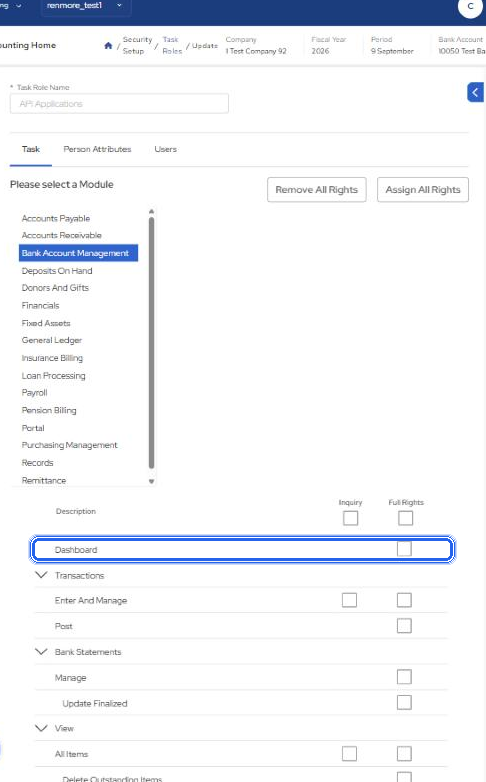
1. The rule: the module's Dashboard right shows the widget
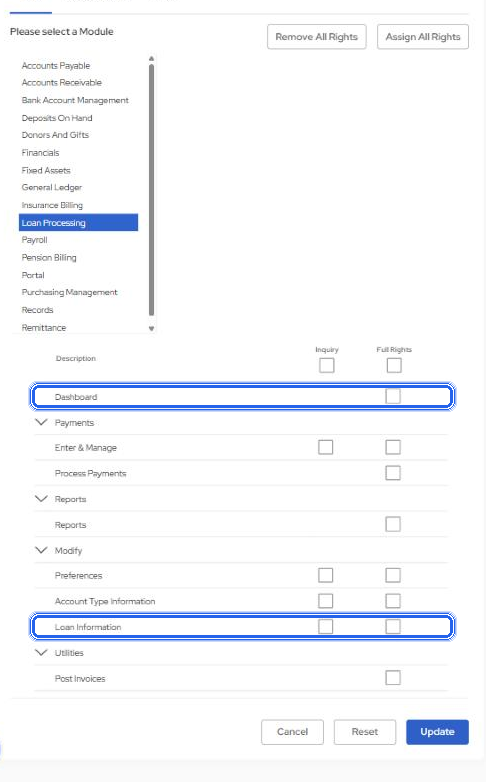
/Payroll) at Inquiry. That is exactly how the old dashboard decided which panels a user could add. No widget needs a right of its own. Further checks exist only for the links and actions in section 2.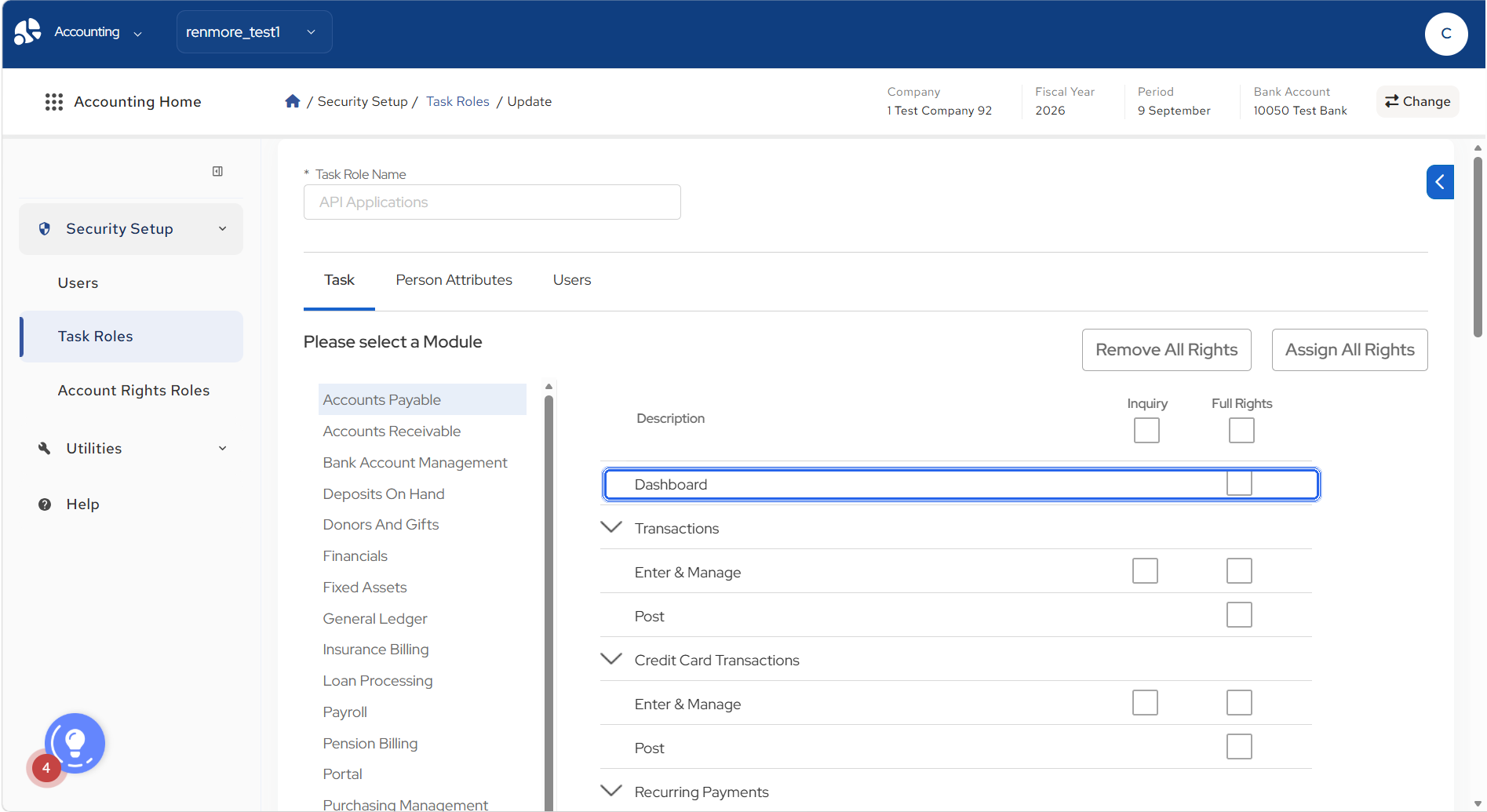
Rights are an exact match on a page URI: holding /Payroll grants the Payroll Dashboard and nothing else. A user without the module right is not offered the widget, so no "no access" face is needed. The API enforces the same test; what the dashboard hides is presentation.
| Widget | Module | Right to show it (Inquiry) |
|---|---|---|
| Budget Compared to Actual | General Ledger | /GeneralLedger |
| Pension Plans | Pension Billing | /PensionBilling |
| Payroll Distributions | Payroll | /Payroll |
| Remittance Pledges | Remittance | /Remittance |
| Receivable Invoices Outstanding | Accounts Receivable | /AccountsReceivable |
| Insurance Billing Plans | Insurance Billing | /InsuranceBilling |
| Deposits on Hand | Deposits On Hand | /DepositsOnHand |
| My Status | none: each query carries its own module right | always offered |
| Payroll Scheduled Time Off | Payroll | /Payroll |
| Loans With Balance Due | Loan Processing | /LoanProcessing |
| Fixed Asset Values | Fixed Assets | /FixedAssets |
| Purchasing Management | Purchasing Management | /PurchasingManagement |
| Main Content Tasks | none: each tile carries its own task | always offered |
| Bank Balances | Bank Account Management | /BankAccountManagement |
| Accounts Payable By Due Date | Accounts Payable | /AccountsPayable |
| Gifts Pledges | Donors And Gifts | /DonorsAndGifts |
| Financial KPI | General Ledger (new in V2) | /GeneralLedger |
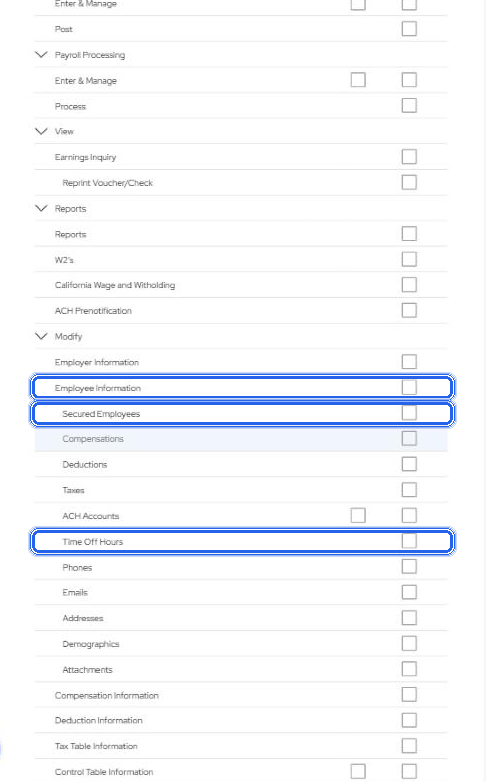
One departure from the old system, by this rule: the old Payroll Scheduled Time Off panel tested a separate task (/Payroll/EmployeeInformation/SecureTimeOffHoursTab); here it follows the Payroll Dashboard right like every other widget, and its Approve and Undo actions carry the extra check (2.5).
2. Where more care is needed: links and actions
The rule for every control below that leads to another page: show it only when the user holds the destination page's right; otherwise the control is absent, as Main Content Tasks does today. A link from a widget in one module to a page in another module the user does not hold is never shown. Do not rely on the destination page refusing the user after the click, which is what the old Purchasing pencil and My Status jump did. The API serving the widget returns, per record, whether the current user may open or act on it, so the widget never reads the rights table.
2.1 Purchasing Management
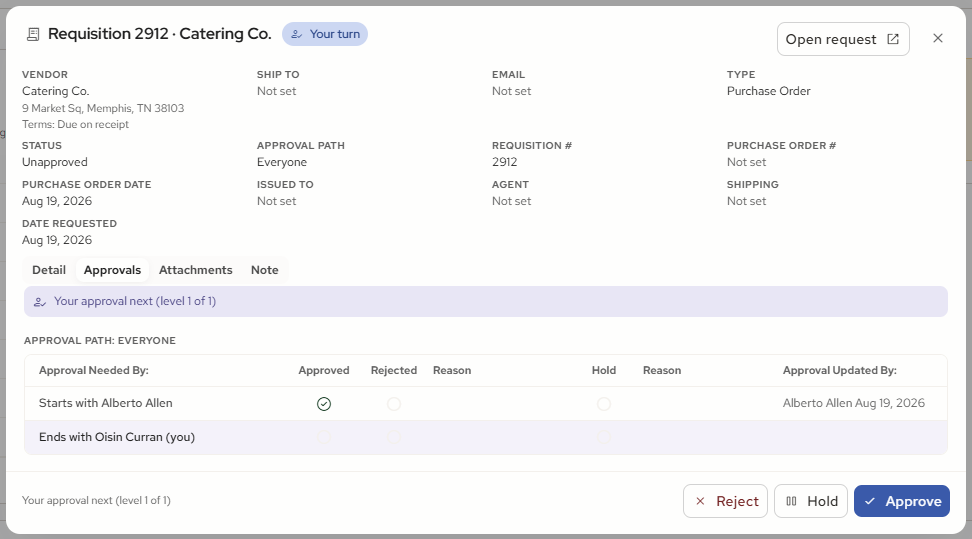
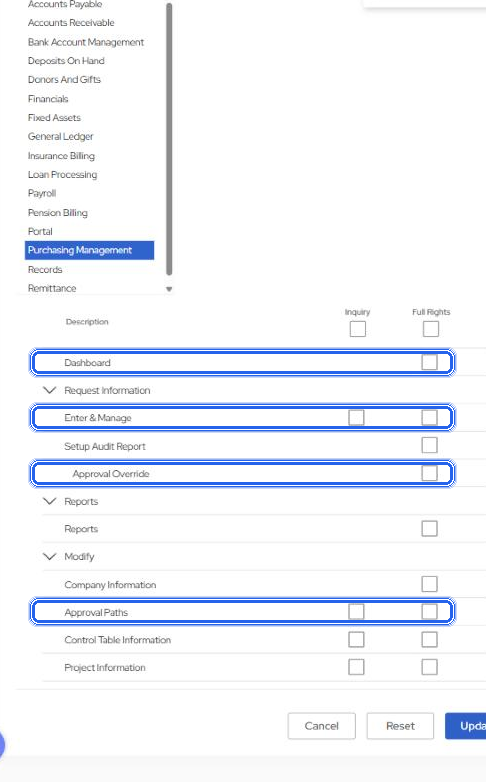
- Approve, Reject: the user is on the request's approval path at the level now acting, or holds
/PurchasingManagement/Requests/ApprovalOverrideat Update. Hold: the user is on the path. These are API actions; the API refuses, hiding the button is presentation. - Open request and attachments:
/PurchasingManagement/Requests/Updateat Inquiry. The widget's own right does not include this page. - Account roles can refuse an order the page right would allow; the API marks each request openable or not.
- The rows a user may see follow the old panel's rule unchanged, Admin shortcut included: for "Awaiting" the user's own level or own requests; for the rest, a request whose path has no users, or where the user is a path user, or the user is an Admin, or holds Approval Override at Update. Approve, Hold and Reject keep the request page's rule above, the only rule the old system has for acting.
2.2 Accounts Payable By Due Date
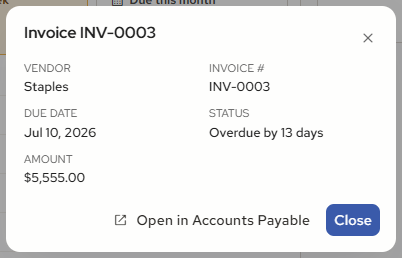
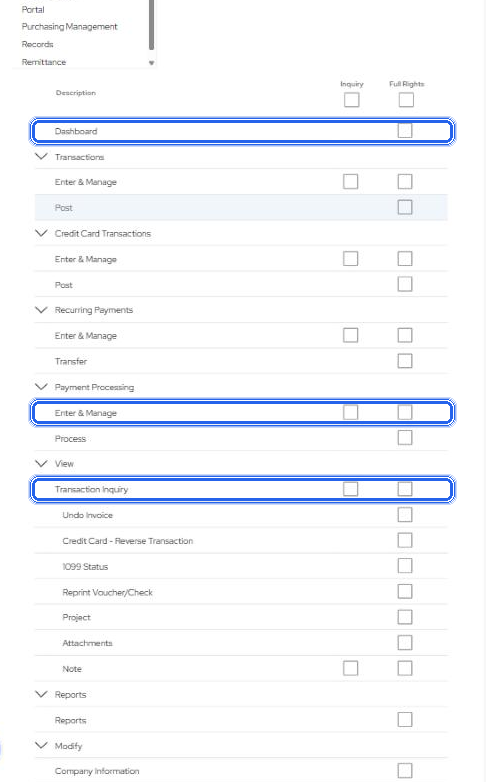
- Open in Accounts Payable:
/AccountsPayable/TransactionInquiryat Inquiry. - Schedule payment, when built: two gates, the AvidPay feature flag on the tenant and
/AccountsPayable/PaymentProcessingat Update. Show a note for the flag, hide for the right.
2.3 Bank Balances
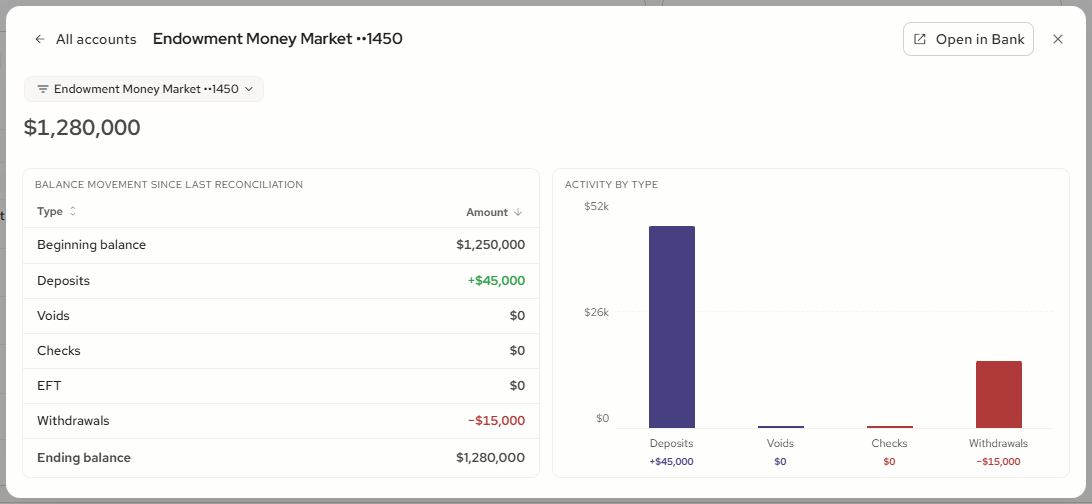
- Open in Bank:
/BankAccountManagement/BankAccountInformationat Inquiry. - Plus the General Ledger account roles: a user may hold the page right and still be refused an account they may not see. The API applies the account filter to the list and to the link.
2.4 Gifts Pledges, Remittance Pledges, Loans With Balance Due
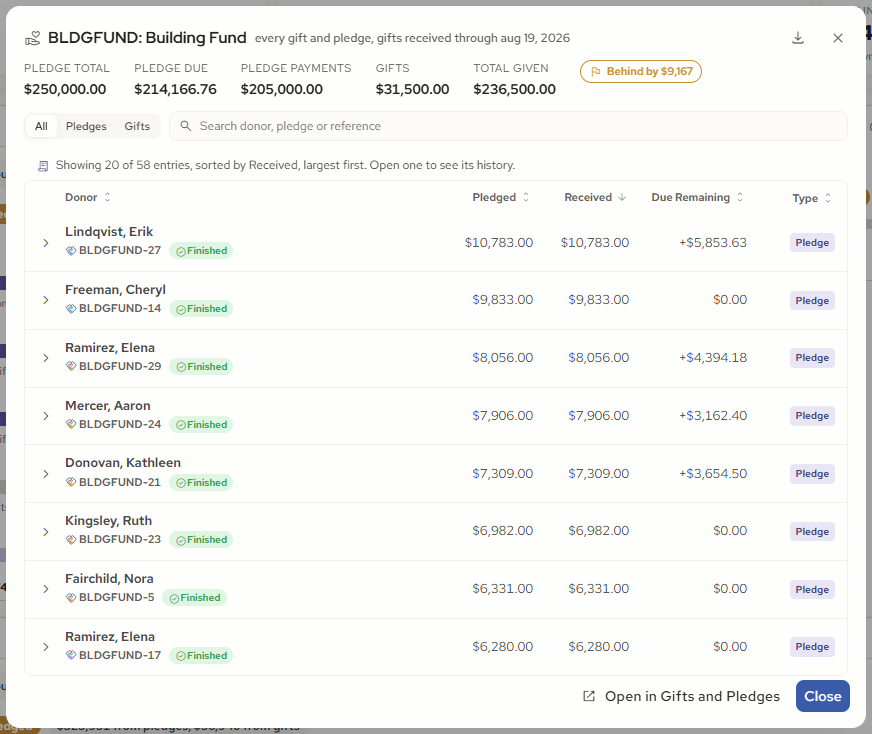
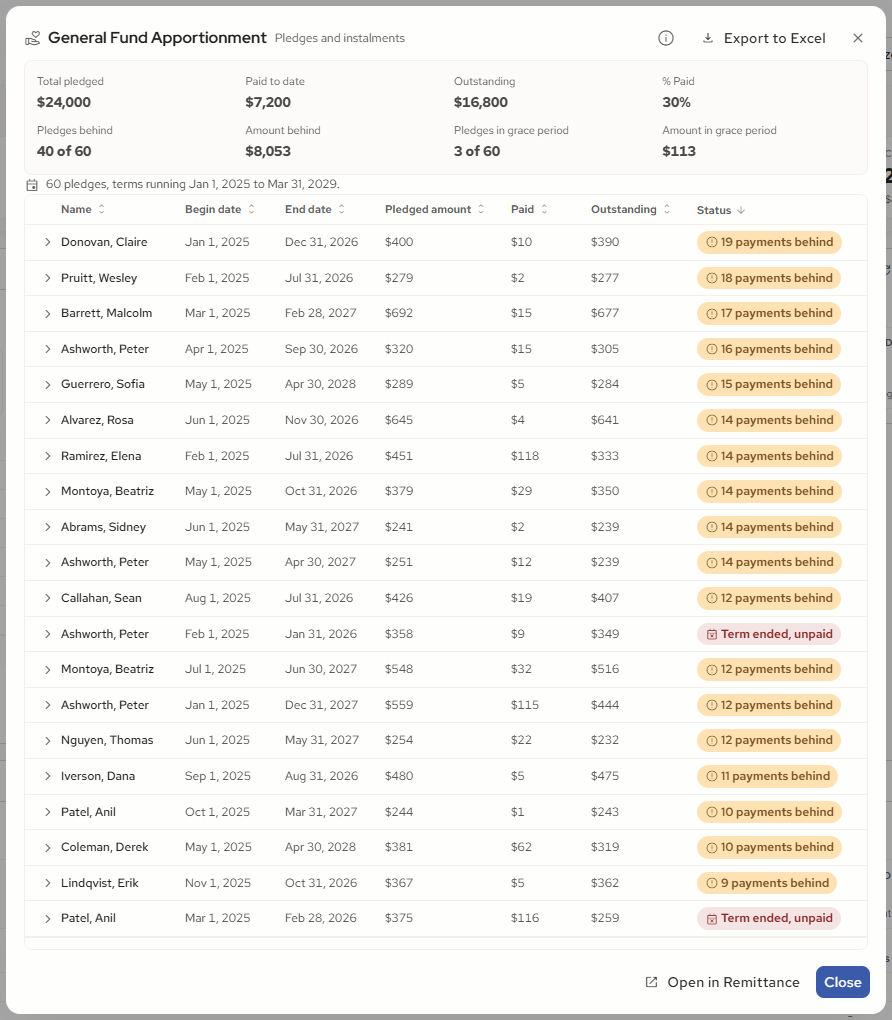
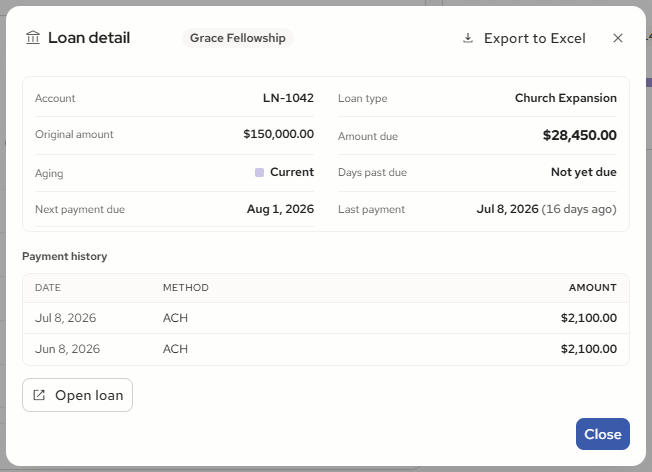
- Open in Gifts and Pledges:
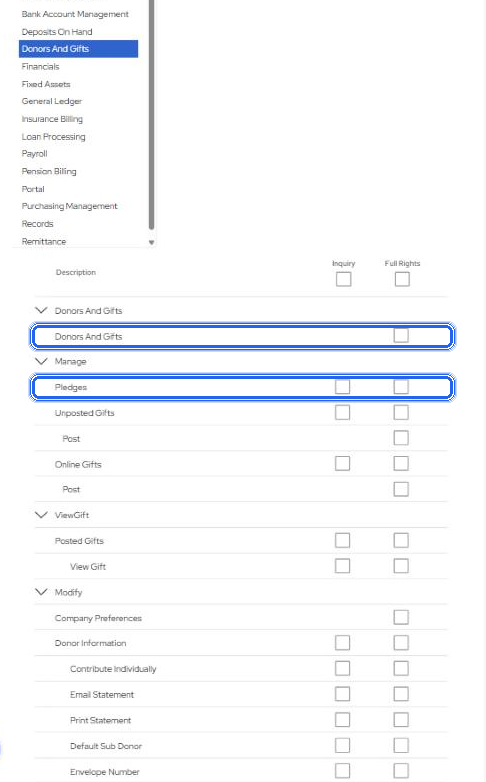
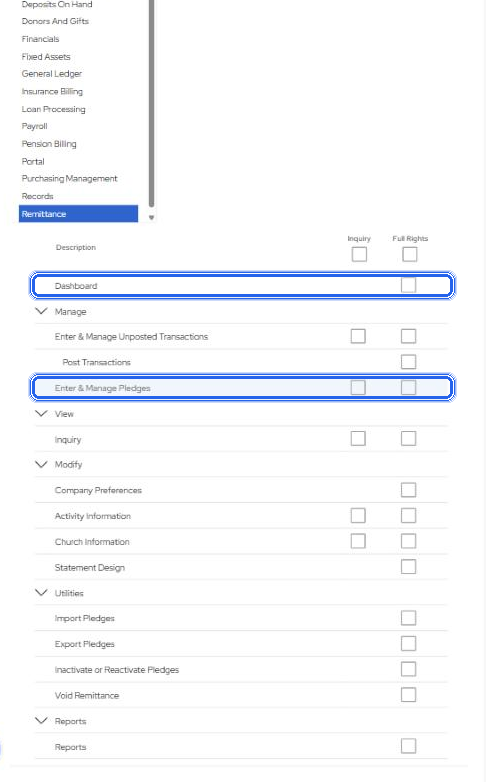
/DonorsAndGifts/Pledgesat Inquiry. Open in Remittance: the Remittance pledge page at Inquiry (route to confirm). Open loan:/LoanProcessing/LoanInformationat Inquiry (route to confirm). - Exports are data, not pages: they follow the widget's own right.
2.5 Payroll Scheduled Time Off
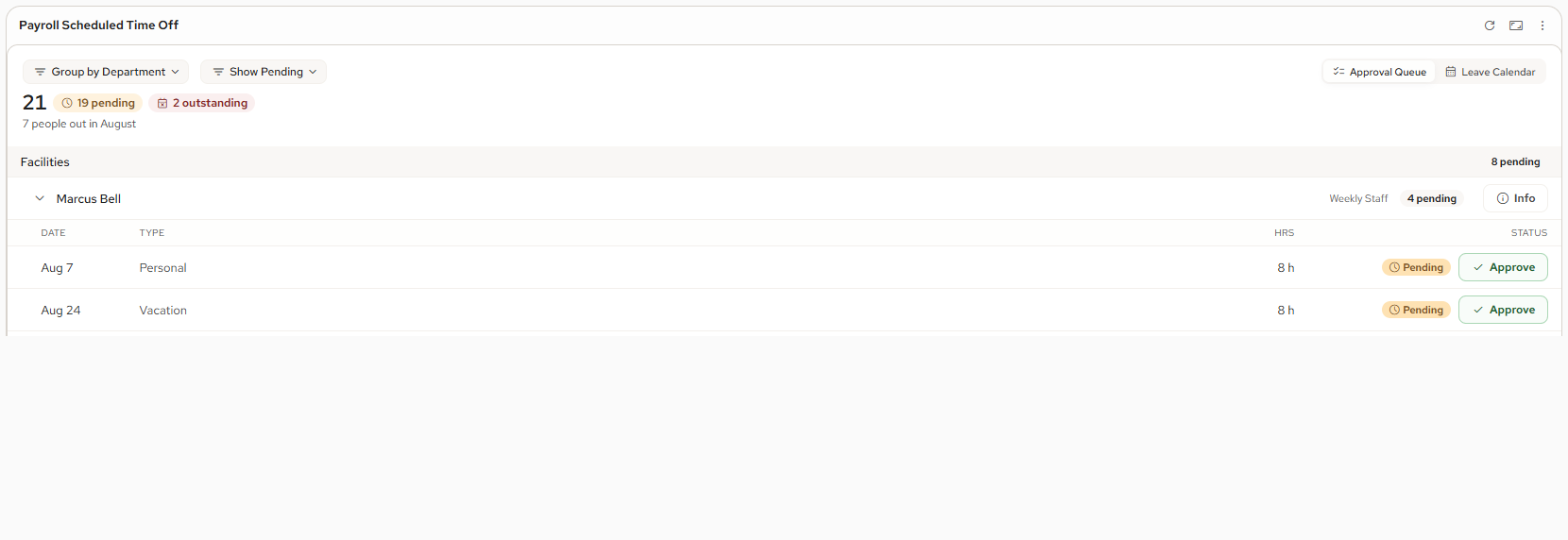
- Approve and Undo need the widget's right only, as the old panel saved an approval; no separate Update check.
- The rows a user sees are the employees whose home department is in the signed-in employee's approval departments ("Can Approve Home Depts"). A user with no employee record sees every department, as the old panel did. Both keep the old panel's behaviour and are recorded in the review document's section 6.
2.6 Payroll Distributions
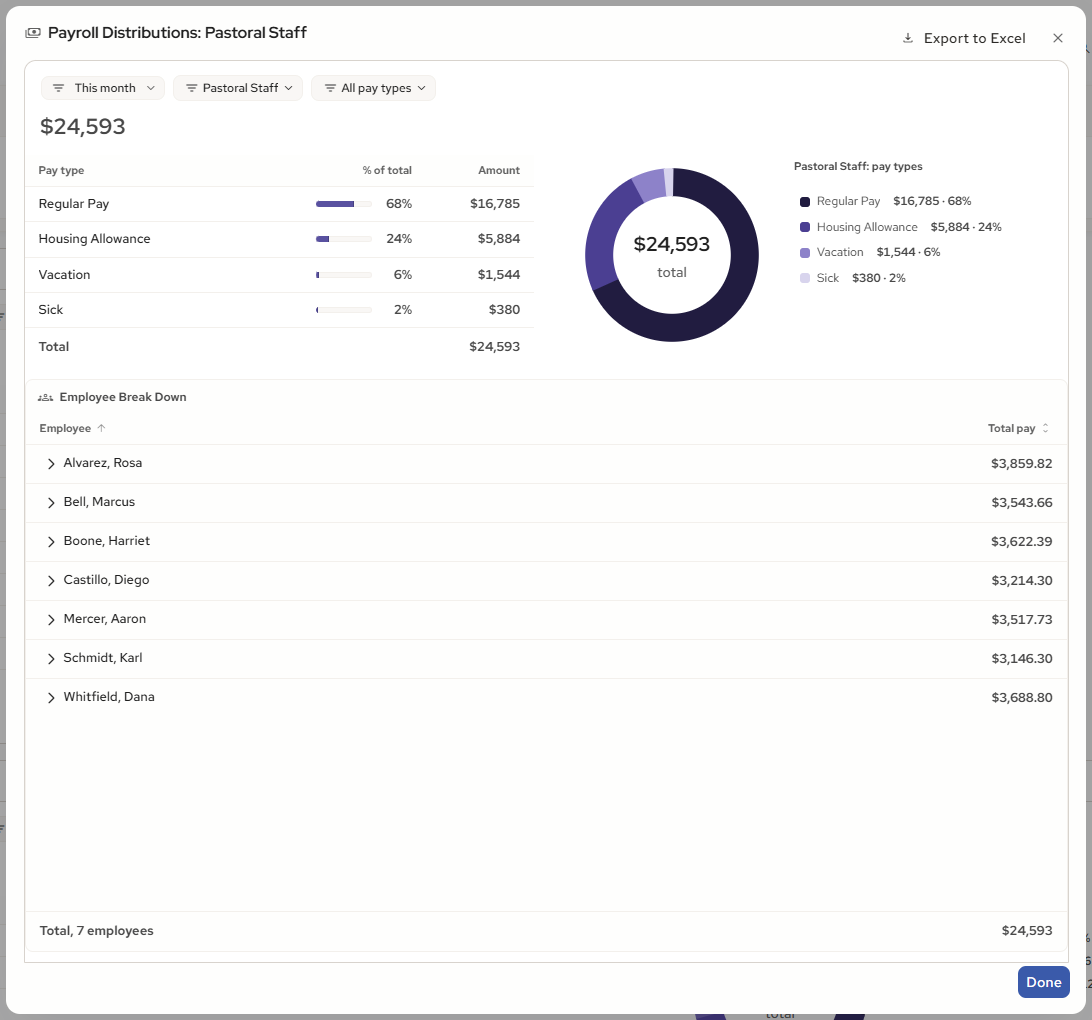
- All or nothing. A user who holds the Payroll Dashboard right sees the widget, the Employee Break Down pop-up and the Excel export in full; nothing inside the widget needs a further right and Secure employees are not excluded. Whether the pop-up should ever be hidden for some users waits on feedback; until then the one simple right governs everything.
2.7 Budget Compared to Actual
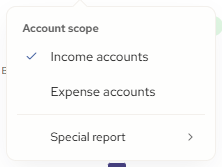
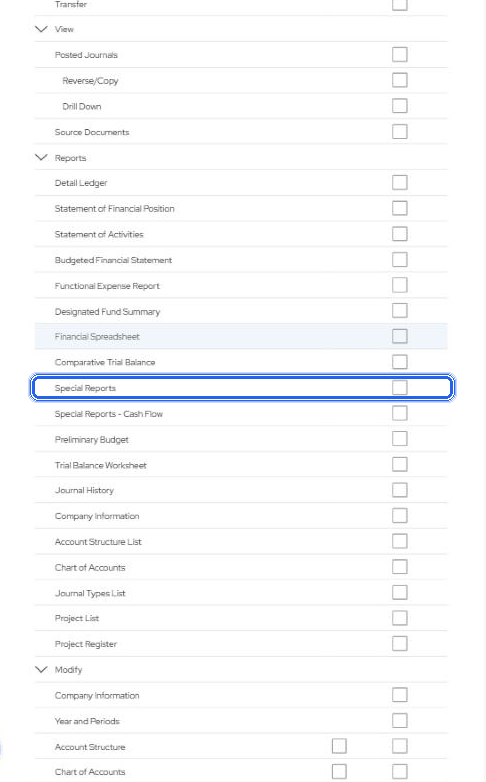
- Special report lines:
/GeneralLedger/Reports/SpecialReportsat Inquiry, as the old panel required. Income and expense accounts need only the module right.
2.8 My Status and Main Content Tasks
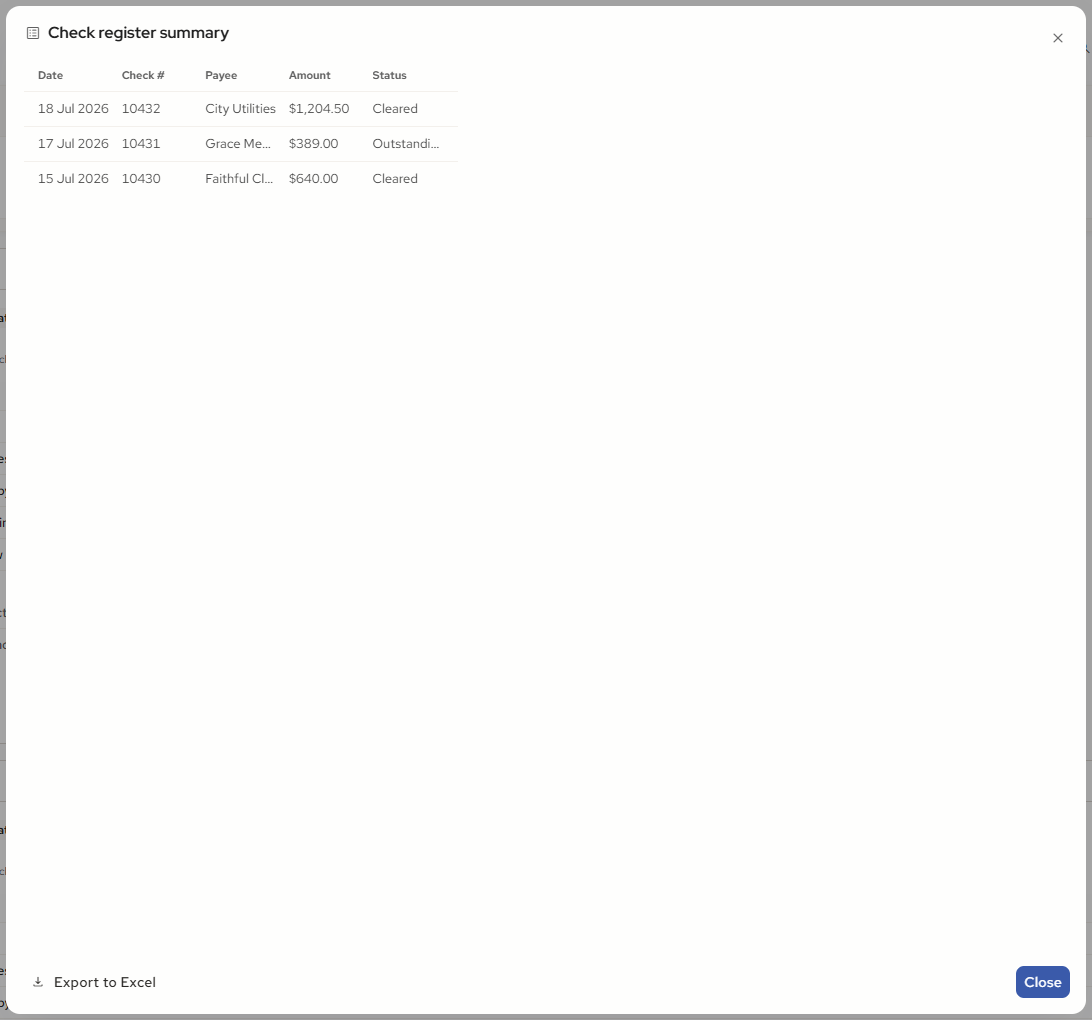
- My Status: a query is offered only with its module right, as today; the jump to its page must test the destination page right before the row offers it, not only the module root.
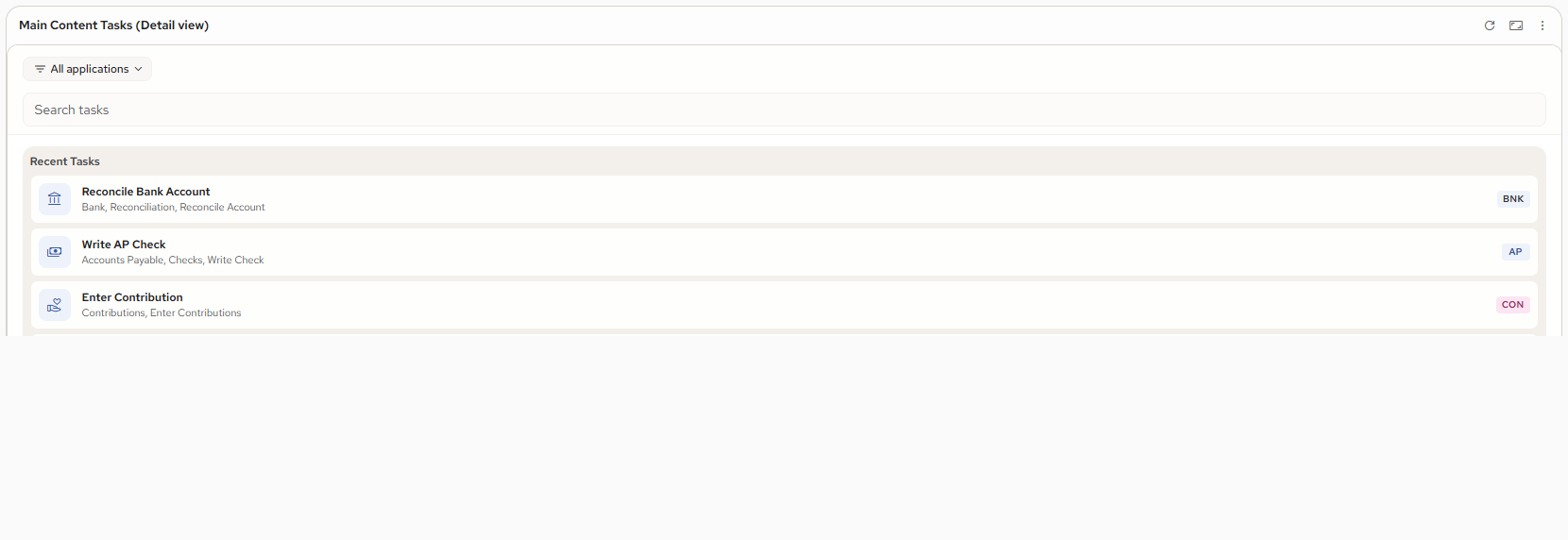
- Main Content Tasks: tiles are the tasks the user holds, so the destination right is checked before the tile shows. My Tasks may list only tasks the user holds. This is the model every other outbound link now follows.
2.9 No link or action
Pension Plans, Insurance Billing Plans, Deposits on Hand, Receivable Invoices Outstanding, Fixed Asset Values and the Financial KPI band have no control that leaves the widget today. Where one is added later (open account, open invoice, open asset), it follows the same rule with the destination page's right.
3. Six things V2 must be careful with
- Dashboard right is not page right. Every "Open ..." control needs the destination page's URI tested at Inquiry, server-side, before it is shown.
- Record-level filters travel with the link. Bank account roles and Purchasing account roles can refuse a record the page right alone would allow; the API marks each record openable or not.
- Two-gate buttons. Schedule payment needs the tenant feature flag and a right; show the note for the flag, hide for the right.
- Exports are data, not pages. They follow the widget's right, with the one personal-data exception in Payroll Distributions.
- Approve, Hold, Reject, Undo are not links. They are API actions with their own tests; hiding the button is presentation, the API refuses.
- Routes to confirm with Value Labs: the Remittance pledge page, the deposit account page, the loan page and the AR invoice page, so the right tested is the one the page really checks.
4. Decisions
Note
- Financial KPI is shown with the General Ledger Dashboard right, like Budget Compared to Actual. No task of its own.
- My Status and Main Content Tasks are carried as today: My Status offers a query only when the user holds that query's module right, and Main Content Tasks shows a tile only when the user holds the tile's task. Neither has a module right of its own.
- Purchasing Management keeps the original panel's list rule, Admin shortcut included; Approve, Hold and Reject follow the request page's rule.
- Payroll Scheduled Time Off keeps the original panel's behaviour: a user with no employee record sees every department, and Approve and Undo need the widget's right only.
- Links out of a widget: a link from a widget to a page in another module the user does not hold is not shown, as Main Content Tasks does. Confirmed.
- Payroll Distributions is all or nothing: the Payroll Dashboard right shows the widget, its Employee Break Down pop-up and its export in full; Secure employees are not excluded. Whether the pop-up should ever be hidden waits on feedback.
Nothing is open. Every widget works from the one simple right, its module's Dashboard row; the only further checks are the links and actions in section 2.